
Android file · iPhone icon
Tiger Exchange App — Safe 34 MB Android Build or an iPhone Icon, Both Live in 2 Minutes
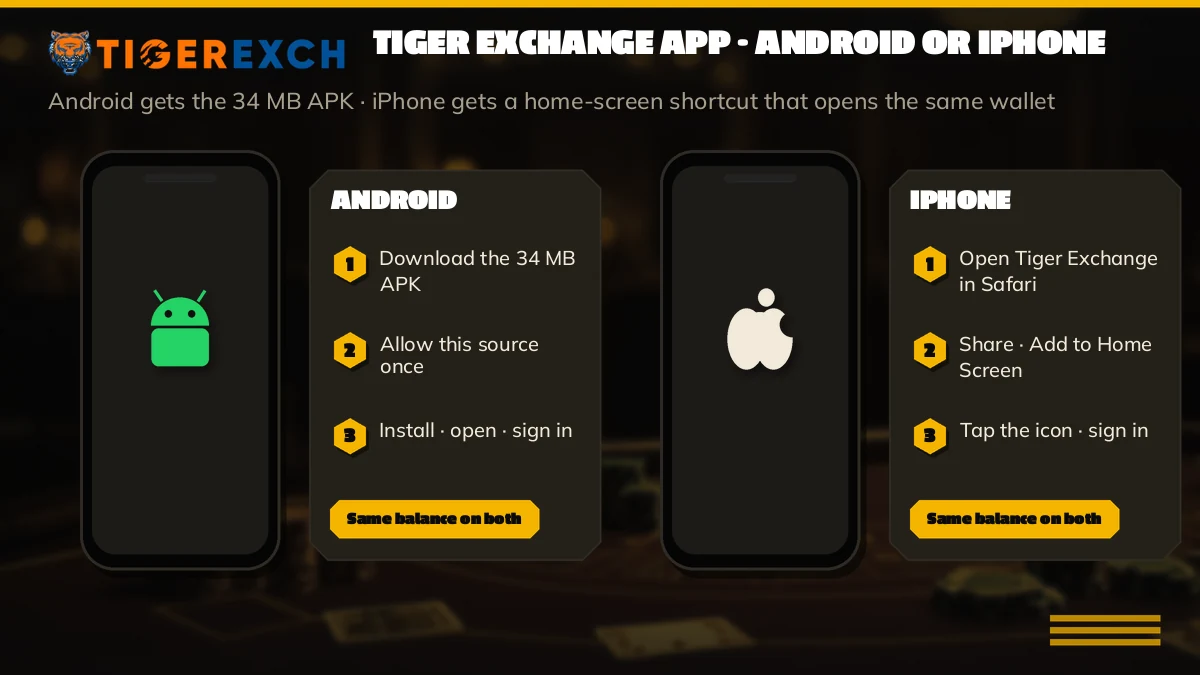
Two routes put the Tiger Exchange app on a phone: a 34 MB install file for Android, or a Safari icon on the iPhone home screen. Each takes under 2 minutes. Both sign in to one Tiger Exchange account, so it is one user ID, one password and the same live cricket board.
Start the Tiger Exchange App Setup in Under 2 Minutes Ask Chat Which Build Suits Your Phone

Tiger Exchange App Sign-In Card — A Quick Test Before Installing
These are the three entries the Tiger Exchange app asks for after it opens, in the same order. Try them on the Tiger Exchange website first. If they work here, they will work on the phone, and you skip the most common reason an install looks broken when it is not.
Tiger Exchange App Download — Free Android File or a Simple iPhone Icon
Two phones, two routes, one account. That is the whole idea. Most people who message the desk about the Tiger Exchange app assume there is a single single download that works everywhere, and there is not, because Apple does not let an iPhone run an Android install file and the Tiger Exchange iPhone route is not sold through the App Store either. So the split below is the first thing to check: which phone is in your hand right now?
Android phones: the 34 MB Tiger Exchange file
- On the phonean installed program listed in the app drawer, removable from Settings like any other
- Sizeabout 34 MB, so a single bar of 4G is usually enough
- Phone needsAndroid 8 or newer
- Permissionone prompt to allow installs from your browser, asked once
- Timeunder 2 minutes from tap to sign-in
- Updatesa newer file goes in over the old one
iPhone: a Tiger Exchange icon added from Safari
- On the phonea shortcut on the home screen that opens Tiger Exchange in Safari
- Sizenext to nothing, because nothing is installed
- Phone needsSafari, which every iPhone already has
- Permissionnone at all
- Timeunder a minute, often closer to thirty seconds
- Updatesnever needed; the icon always loads the current site
Which is better? Hard to say, and it mostly does not matter. The Android build feels a little more like a proper app: it sits in the app drawer, opens without a browser bar, and you can find it with the phone's own app search. An iPhone icon is lighter and never goes out of date. Prices, markets and your balance are identical on both, since all of that lives on the Tiger Exchange account and not on the handset.
There is also a third route nobody has to choose: skip both and keep using the Tiger Exchange site in Chrome or Safari. It works. Installing only saves you the typing, the tab-hunting and a second or two at sign-in, and for someone who places a few bets around one IPL match a week, that may not be worth 34 MB. For anyone opening Tiger Exchange daily, it usually is.
Blank screen overnight? Indian networks block betting domains now and then, and a blocked address is the usual reason a working Tiger Exchange app goes blank between one evening and the next. What fixes it depends on the phone. Android users ask chat for the current file or address; iPhone users re-pin the icon from the new one. Your ID and balance were never stored on the handset, so nothing is lost either way.
Tiger Exchange App on Android — Installing the 34 MB Build
Android lets you install apps from outside the Play Store, but since version 8 it asks permission browser by browser. That one prompt is the only unusual part. Everything else is tap, wait, open.
- Sign in on the Tiger Exchange website from your phone, or ask the chat desk for the current file link.
- Tap the download link. Chrome may warn that this type of file can harm your device; you asked for it, so tap Download anyway.
- Pull down the notification shade and tap the finished download. On a first install, Android stops you with a note about unknown apps.
- Tap Settings on that message, switch on Allow from this source for the browser, then press back.
- Tap Install and wait; ten to twenty seconds on most phones from the last few years, then Open appears.
- First launch shows the sign-in screen. Type the ID, the password and the four digits printed beside the code box, and the cricket lobby loads.
That is the whole job. File details and the install notes for older phones sit on the Tiger Exchange APK download page, so this one stays focused on choosing the right route for your phone.
How long is the download itself? Simple arithmetic: 34 MB on a 10 Mbps mobile connection is about 27 seconds, and on a weak 2 Mbps signal it stretches past two minutes. So if the Tiger Exchange file seems slow, its the network, not the file. Wi-Fi at home is the easy answer.
If you tapped Don't allow by mistake at step 4, nothing is broken. On most phones the switch lives under Settings, then Apps, then Special app access, then Install unknown apps; pick the browser you used and turn it on. Samsung and Xiaomi bury it a level deeper in some versions, so searching settings for unknown is often quicker than clicking through menus.
When the Android install fails, it nearly always fails in one of three ways. App not installed usually means the phone ran short of storage storage or the download stopped halfway; delete the file, free some space, and download again. A parse error points to an Android version older than 8, and no setting will fix that on the same handset. And if the install button stays greyed out, a screen-dimming or overlay app (night-light filters are the usual suspects) is sitting on top of the prompt — pause it for a minute and try again.
Tiger Exchange App on iPhone — The Safari Icon, Step by Step
An iPhone cannot open a 34 MB Android file, full stop. What it can do is pin any website to the home screen as an icon, and that is how the Tiger Exchange app works on iOS. Tap the icon and Tiger Exchange opens on its own, no typing the address, no hunting through bookmarks.
- Open Safari on the iPhone in an ordinary tab, not a Private one.
- Load the working Tiger Exchange address and sign in once, so the page you pin is the lobby rather than a blank login.
- In Safari, hit the Share control on the bottom bar while the Tiger Exchange page is open.
- Scroll the share sheet and choose Add to Home Screen.
- Keep the name as Tiger Exchange or shorten it to Tiger365 — whatever you will recognise among your other icons.
- Tap Add. Your icon appears on the home screen straight away.
Thirty seconds, roughly. Maybe a minute if you stop to rename it.
On the rename: iPhone labels get cut short on the home screen once a name runs long, so Tiger Exchange may show up trimmed with dots at the end. Tiger365 fits whole. It changes nothing about what the icon opens, it just makes makes it easier to spot between your UPI app and WhatsApp.
Some differences from Android are worth knowing before you rely on the icon. Safari can remember your user ID and password through iCloud Keychain, which saves typing; the 4-digit validation code still has to be entered each time, because it changes. There is no file to update, ever — the icon simply loads whatever the Tiger Exchange site is serving that day. And if the address behind the icon gets blocked, you do not reinstall anything. Delete the icon, open the current Tiger Exchange address in Safari, and add a fresh one. Your ID and your balance carry straight over.
A common pattern in chat goes like this: someone uses an Android phone for work and an iPhone at home. They install the file on one, pin the icon on the other, and sign in to both with the same ID. Both screens show the same balance, which surprises people the first time (it should not, but it does), because the money sits on the Tiger Exchange account, not on either phone.
iPhone tip. If the icon opens to a login page every single time, Safari is probably in Private mode. Switch back to a normal tab, sign in, and add the icon again from there.
Tiger Exchange App Search Forms — Clear Answers on Every Name
People reach this page by typing the Tiger Exchange app, the Tigerexch app, the Tiger365 app or the Tiger Exchange app download, and every one of those leads to the same two routes described above: the 34 MB file for Android and the Safari icon for iPhone. There is no separate product hiding behind any of the names.
Tigerexch app or Tiger365 app — which name the download on this page carries
The Android file installs under the Tiger Exchange name, but the desk and older links still call it the Tigerexch app or the Tiger365 app. Three things never change between those names:
- whichever name is on the icon, one Tiger Exchange user ID opens it
- a Tiger365 app balance and a Tigerexch app balance are the same number
- cricket, casino and cashier screens look identical under both names
Tiger Exchange app download facts, row by row
- Android file size for the Tiger Exchange app download
- About 34 MB, Android 8 or newer.
- iPhone route for the Tiger Exchange app
- A Safari icon added through Share, then Add to Home Screen.
- Setup time on either phone
- Under 2 minutes.
- Sign-in inside the Tigerexch app
- User ID, password and a 4-digit validation code.
Tigerexch App Login — The Same Free ID Works on Android and iPhone
No second registration exists for the app. The Tiger Exchange app opens to the same sign-in screen the website uses, and it wants the same three things: your user ID, your password and the 4-digit validation code displayed next to the entry box. If you already bet on the website, you already have everything the app needs.
New to Tiger Exchange? Get the ID first and install second. Chat sends a user ID and a first password, and the app will ask you to change that password the first time you sign in — on whichever phone you happen to use first. After that, the new password is the one both phones want. The Tiger Exchange login page covers the sign-in screen itself in more detail, including the demo lobby and the code that comes by OTP.
When the Tiger Exchange app will not let you in
Almost every app login problem that reaches chat in chat falls into one of the rows below. Work down the table; most people are back in within a minute.
| What you see | Likely reason | What to do |
|---|---|---|
| Validation code rejected | The 4 digits changed before you finished typing | Retype the code shown now, then sign in quickly |
| Wrong password on a new ID | The first password from chat was already replaced on another phone | Use the password you set on first login |
| App opens to a blank or endless loading screen | The address behind it is blocked on your network | Switch between Wi-Fi and mobile data, or ask chat for the working address |
| Signed out after updating | The old app was uninstalled before the new file went in | Sign in again; the balance is untouched |
| iPhone icon asks for login every time | Safari Private mode | Re-add the icon from a normal Safari tab |
Moving the Tiger Exchange app to a new phone
A new handset starts empty, and that is fine. On it, install the 34 MB file or pin the Safari icon, then sign in with the user ID and password you already use. Your bets, history and balance appear as they were. On the old phone, sign out inside the app before you hand it on or reset it, and on Android remove the app from Settings so the next owner does not find a Tiger Exchange icon waiting. Switching from Android to iPhone, or back, works exactly the same way; the account does not care which phone opens it.
One small catch with a new phone: if you changed the password on the old one and never wrote it down, Safari or Chrome may not have synced it across. Reset it through chat before wiping the old handset rather than after.
If none of those fit, message the Tiger Exchange desk on WhatsApp with a screenshot of the error. A screenshot saves a lot of back-and-forth, honestly more then any description does.
Tiger365 App Screens — Live Cricket, Casino Rails and a Fast Cashier
Once you are signed in, the Tiger365 app is the website squeezed onto a phone, nothing removed. Three screens get most of the use.
Cricket and the sports strip in the Tiger Exchange app
The app opens on the sports strip, with cricket first and football, tennis, kabaddi and horse racing alongside. Each cricket match shows a back price and a lay price, and you can take either side; tap a price and the bet slip opens with the stake box ready to type into. On a small screen the slip covers part of the board while it is open, which takes a match or two to get used to.
Casino rails on the Tiger Exchange app
Swipe past the sports and the casino rails start: Aviator, Teen Patti, Andar Bahar, Dragon Tiger, roulette, Lucky 7 and a row of slots, with QTech Games as the games partner. These run inside the Tiger Exchange app on the same balance as your cricket bets, so moving from a T20 over to a round of Teen Patti does not need a transfer. A demo lobby sits there too if you want to see a a table before staking anything.
Cashier inside the Tiger Exchange app
₹300 is the smallest top-up. UPI, IMPS and bank transfer all run from inside the app. Cash-outs come after KYC and only to an account under your own name, with a usual wait near 30 min.
The cashier screen is where the app earns its place. Paying in from a phone means the UPI app is one switch away, so a ₹300 top-up takes less time on the Tiger Exchange app than it does on a laptop. A typical top-up from the app goes like this: tap deposit, pick UPI, enter ₹300, switch across to your UPI app, approve, and switch back to Tiger Exchange. No laptop, no copying account numbers between windows. Limits, KYC and payout timing are spelled out on the Tiger365 withdrawal page.
Keeping the Tiger Exchange app current
Android only. When a newer build comes out, download it and install it straight over the old app — do not uninstall first. Installing over the top keeps your login, so you open the app and carry on. Uninstalling first wipes the saved session, which is why people who do that think the update logged them out. The Tiger365 Pro APK page covers the copy of the same build served from the pro address, and the same rule applies to it: over the old one, never after deleting it.
iPhone users can skip this whole section. A Safari icon has nothing to update.

Tiger Exchange App Questions — Quick, Genuine Answers
Is there a Tiger Exchange cricket app for Android?
Yes. The Android route is a 34 MB Tiger Exchange file that installs like any other app on Android 8 or newer and opens onto the live cricket board after sign-in. Back and lay prices and your bet slip sit on the same screen you already use on the website, with the same balance.
Does Tiger Exchange have an iPhone app?
Not as an App Store download. iPhone users add a Tiger Exchange icon from Safari by opening the address, tapping Share and choosing Add to Home Screen. It takes under a minute, uses almost no storage and signs in with the same user ID, password and 4-digit validation code as Android.
Where do I get the Tiger365 app download?
Ask the chat desk for the current file link or sign in on the website from your Android phone, then tap download. The Tiger365 app and the Tiger Exchange app are the same 34 MB build under two names, so whichever link you are sent, the login inside is identical.
Why is my Tiger Exchange app login not working?
Usually the 4-digit validation code changed while you typed, or the first password from chat was already replaced. Retype the code shown beside the box and check the password. If the screen will not load at all, switch between Wi-Fi and mobile data or ask chat for the working address.
What is the Tigerexch cricket exchange app?
It is the phone version of the Tigerexch sports exchange, where each cricket market shows a back price and a lay price and you can take either side. The same app carries football, tennis, kabaddi, horse racing and the casino rails, all on one Tiger Exchange balance.
Tiger Exchange App Download Spellings — Simple Variants People Type
- tiger exchange app
- tigerexch app
- tiger365 app
- tiger exchange app download
- tiger exchange app for android
- tiger exchange app download apk
- tiger exchange iphone app
- tiger exch app install kaise kare
- tiger365 app login