
Android 8 or newer
Tiger Exchange APK Download — Verified 34 MB Package, Unknown-Source Prompt Once, Cricket Board Inside
Keep your current Tiger Exchange login; the app reads it unchanged. Fetch the 34 MB Tiger Exchange APK download on any Android 8 or later handset, say yes to the single permission request, and the cricket board opens with your own wallet on it. No second account, no fresh deposit.
Download the 34 MB Tiger Exchange APK Ask the Desk to Resend the APK Link
Tiger Exchange APK Sign-In — Fast Entry With the Login You Already Use
Installing the app does not create a second Tiger Exchange account. The Tiger Exchange APK opens on the same sign-in screen you see in the browser: user ID, password and the 4-digit validation code shown beside it. Type those, and your existing wallet loads.
No ID yet? That takes about a minute on the Tiger Exchange register ID page, and the app accepts it straight away.
Tiger Exchange APK Spec Sheet — Clear Numbers Before You Tap Download
- 34 MB file
- Android 8+
- 1 install prompt
- Same ID
Three numbers decide whether the Tiger Exchange APK will install on your phone. Check them before downloading, not after a failed attempt.
- File sizeRoughly 34 MB. If the finished download in your Files app is far smaller, it was cut off midway and Android will refuse to open it. Delete and fetch it again.
- Android versionAndroid 8 (Oreo) or anything newer. Settings, then About phone, then Android version tells you in ten seconds. Phones stuck on 7 or below cannot run this Tiger Exchange build at all.
- Install promptA single permission screen, tied to whichever app opened the Tiger Exchange file. Later builds installed the same way do not ask again.
- AccountCarried over. Whatever Tiger Exchange wallet you funded in Chrome is the one the app shows.
- What opensThe cricket board first, with the rest of the Tiger Exchange lobby a tap away: football, tennis, kabaddi, horse racing and the casino rails.
- Apple handsetsOutside this file entirely. Scroll to the after-install part of this page for the Safari route.
That is the whole spec. People sometimes expect a 200 MB game-style download because the lobby carries live casino tables, but the heavy parts stream in when you open them; the file itself stays small. A 34 MB package on an ordinary 4G connection is probably a minute or less, longer on crowded evening networks.
Tiger Exchange APK Download, Start to Sign-In — Simple Route on Oreo and Later
Six steps, and the third is the only one that needs a decision from you. The labels below are from stock Android; Samsung, Xiaomi, Vivo and Oppo phones word them slightly differently but sit in the same place.
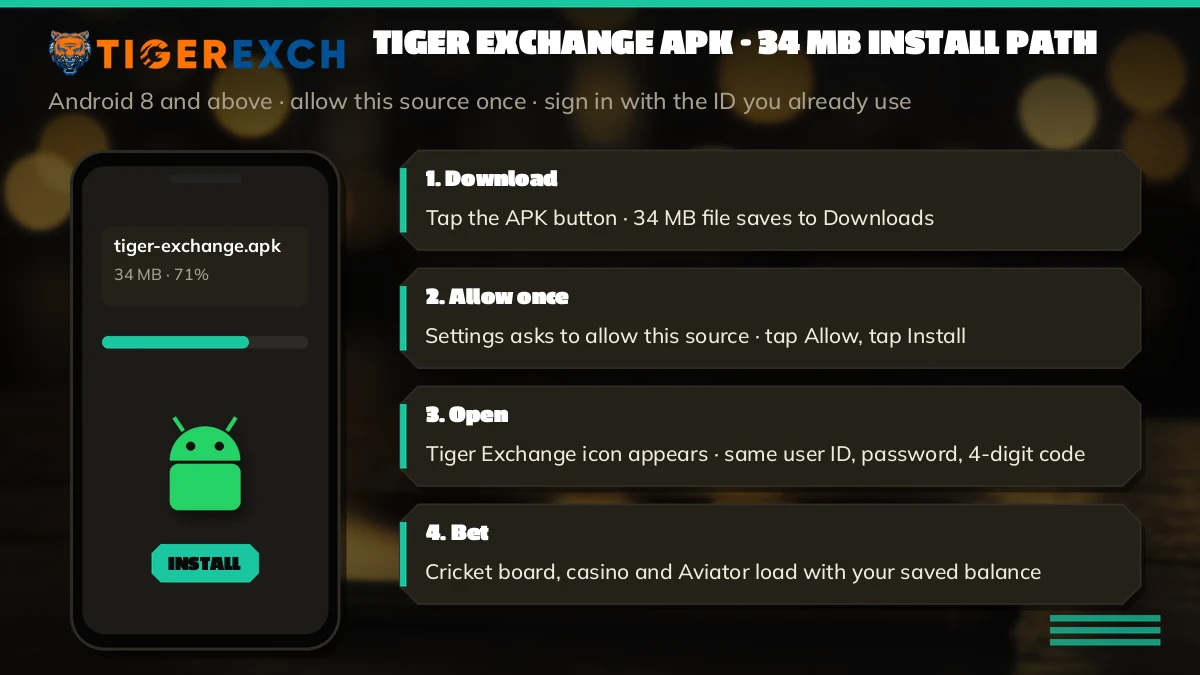
- Start the file from the phone itself. Press Download the 34 MB Tiger Exchange APK near the top and keep the display awake until it finishes; several Android skins pause transfers when the screen sleeps, and a paused, half-written file is where most later errors begin.
- Launch what you just saved. The completion alert in the shade is the quickest way in; if you swiped it off, Files keeps the Tiger Exchange package under Downloads. Chrome may grumble that files of this type can be harmful. It says that about every sideloaded app, Tiger Exchange or otherwise.
- Answer the one prompt. Android says your phone is not allowed to install unknown apps from from this source. Tap Settings, switch on Allow from this source for the browser, and press back. This is the single unknown-source prompt the Tiger Exchange build triggers.
- Tap Install. The installer shows the Tiger Exchange name and icon. Installing usually finishes in under half a minute on a phone with free space.
- Tap Open and sign in. User ID, password, then the 4-digit validation code shown on the screen. Your balance appears exactly as it stands on the website.
- Optional tidy-up. Go back to Settings, Apps, your browser, Install unknown apps, and switch the permission off again. The Tiger Exchange app keeps working; you simply close the door behind you.
Step three is where most people people stall. They tap Cancel because the wording sounds alarming, then wonder why nothing installed. The prompt is Android asking about your browser, not a verdict on the Tiger Exchange file or it's contents. If you cancelled by mistake, open the APK again from Downloads and the same screen comes back.
A word about Play Protect. On some phones a second screen appears saying the app was not scanned or is unrecognised, because it did not come from the Play Store. Tapping More details usually shows an Install anyway option. Whether you want to press it is your call; the Tiger Exchange APK from the link here is the one the desk hands out, and the size check above is a decent decent way to confirm you have the right file.
When the desk sends the Tiger Exchange APK inside WhatsApp
Some users skip the browser entirely: a message to +91 81097 11726 and the Tiger Exchange APK lands as a document attachment. One detail shifts when that happens. The app that opens the file is now WhatsApp, so the unknown-apps permission in step three has to be granted to WhatsApp, not Chrome. Android names the app on the prompt itself; read it before tapping.
Two smaller quirks. WhatsApp sometimes holds documents until you tap the download arrow on the message, and on low-storage phones it quietly fails to save them at all. If the chat shows the file name but tapping it does nothing, free some space and tap again.
Downloaded the Tiger Exchange APK on a laptop by mistake
It happens, usually from a desktop search. You can move the file across with a USB cable into the phone's Download folder, or mail it to yourself, but every hop adds a chance of a truncated copy. Simpler: open this page on the phone and start again. A 34 MB fetch costs less time than a cable hunt.
Tiger Exchange APK Old Version vs the Latest Working Build
Search suggestions show plenty of people typing tiger exchange apk old version, usually because a friend sent a file months ago or because a new phone needs the app and the old link is gone. Here is how the two compare.
| Point | Old Tiger Exchange APK file | Latest Tiger Exchange build |
|---|---|---|
| Where it comes from | A forwarded file, a mirror site, an old chat | The download button on this page or the desk link |
| Address inside | May point at an address that no longer answers | Points at an address that answered on our latest check |
| Your login | Same user ID and password | Same user ID and password |
| Android support | Unknown, depends on its age | Android 8 or newer |
| Updating later | May clash with a newer file if signed elsewhere | Installs over itself and keeps you signed in |
The login row is the one people worry about, and it is the row that never changes. Your Tiger Exchange ID lives on the account, not inside the app file, so whichever build you end up with, the same password opens the the same wallet. What does change is the address an old file was built to call. Betting domains in India get blocked and replaced often, and a build from last season may still try to reach a door that has been shut.
So there is no real reason to hunt for an old version. The newer file is the same size class, runs on the same phones, and points somewhere that works. If you have a specific reason — an older phone, say — check its Android version first. Below 8, no Tiger Exchange build will help, old or new.
Searching tiger exchange apk www tigerfair co? What we found on 2 October 2026
That long query reads like someone copying an address off an old WhatsApp forward, and probably it is. We pointed a request at tigerfair co on the evening of 2 October 2026: no connection, nothing served, no redirect onward. tigerexchindia net went dark in that same round of checks.
That leaves two practical points. First, a page that appears under that name in search results and offers an APK is not something we can vouch for; it may be a copy using the brand. Second, nothing about your account depends on that address. Tiger Exchange runs several mirrors because blocks keep happening, and one ID works on all of them. The full dated list of which Tiger Exchange addresses answered, and where each one landed, sits on the Tiger365 Pro address status page.
Tiger Exchange APK Install Errors — Quick Fixes for the Common Ones
When the Tiger Exchange APK refuses to install, Android almost always tells you why, just in unhelpful words. Match the message to the row.
- There was a problem parsing the packageAndroid could not read what it was handed. Hold the file up against 34 MB: short means fetch it again with the screen kept on. Full size and still this message? Then the handset predates Oreo and no Tiger Exchange build will run there.
- Install blocked / For your security, your phone is not allowedThe unknown-apps permission is still off for the app that opened the file. Note which app that was — Chrome, Files, a messaging app — because the permission belongs to that one specifically. Switch it on and retry.
- Blocked by Play ProtectThe phone did not recognise the Tiger Exchange app because it is not from the Play Store. More details, then Install anyway, if your phone offers it. Some work phones managed by an employer disable this entirely.
- Not enough storage / App not installedYou need room for the 34 MB file plus the installed app, which unpacks larger than the download. Clear a few hundred MB of photos or cached videos, then try again.
- App not installed as package conflictsAn older Tiger Exchange APK from another source is already on the phone and was signed differently. Uninstall it from Settings, Apps. Your account is safe on the server; you only lose the saved password on that phone.
- Installs fine, then a blank screenThe app is calling an address your network is blocking right now. Switch between mobile data and Wi-Fi once. If it stays blank, message the desk on +91 81097 11726 for the current link.
A typical case on the WhatsApp desk goes like this. Someone downloads the file twice, gets the parsing error both times, and is sure the Tiger Exchange APK is broken. Turns out the phone is a 2017 model that never got Android 8. No fix exists for that phone, unfortunately; the browser version of Tiger Exchange works on it though, because the browser does the heavy lifting rather then the app.
Another one we hear: the install worked, then stopped working weeks later. That is almost never the app. It is the address behind it getting blocked, which the next update or a fresh download from this page usually sorts out.
After the Tiger Exchange APK Is In — Simple Updates, iPhone and New ID Options
Once the app is on the phone, three questions usually follow. How do you keep it current, what does an iPhone user do, and what if there is no account yet.
Keeping the Tiger Exchange build current
Sideloaded apps never refresh themselves. You fetch a fresh Tiger Exchange APK from here when needed and run it; because because the existing app is already present, the installer button reads Update, and your session survives. The build number hides at the foot of Settings, Apps, Tiger Exchange, App info, if you ever need to quote it to the desk.
How often? Whenever the app stops loading, or when the desk mentions a new build. There is no fixed schedule that we know of. The same file is also served from the Pro address, and the step-by-step for updating over an old install lives on the Tiger365 Pro APK update page.
No Tiger Exchange APK for iPhone
Apple phones refuse APK files outright, so a page promising an iPhone Tiger Exchange APK is either confused or fishing. iPhone owners add the site to the home screen from Safari instead, which takes under two minutes and gives an icon that opens the same lobby. The steps, with the Safari share-sheet route, are on the Tiger Exchange app page for Android and iPhone.
Installed the app but have no Tiger Exchange ID
The app is only a door. Without an ID it shows the sign-in screen and not much else (the demo lobby button is there, mind). Opening an account takes around 60 seconds: mobile number, username, password and an OTP. That flow is on the Tiger Exchange register page, and the ID you make there works in the app the moment it exists.
Tigerexch APK Searches — Real Phrases Tiger Exchange Users Type
- tiger exchange apk download
- tigerexch apk
- tiger exchange apk old version
- tiger exchange apk www tigerfair co
- tiger exchange app download for android
- tiger exchange apk latest version
- tiger exchange 365 apk
- tiger exchange cricket app
- tiger exchange apk kaise download kare
- tiger365 apk
Tiger Exchange APK Download Keywords — Clear Answers in Two Columns
What the tiger exchange apk download on this page actually is
The tiger exchange apk download here is a single Android file of roughly 34 MB for Android 8 and newer. Some people call it the tigerexch apk, others just the tiger exchange apk; all three names describe the same build, and it signs you in with the ID you already hold.
- Chrome asks for install rights on day one, and updates go through quietly afterwards
- Login carried over from tigerexch in the browser, wallet included
- Matches load first; Tiger Exchange casino games sit a swipe further along
Where the tiger exchange apk old version fits in this install plan
An old file still logs you in, because the account sits on the server. The risk is the address baked into it, which may be blocked by now. Swapping to the latest Tiger Exchange build takes three moves:
- Download the current file from the button above
- Install it over the old app, or uninstall first on a package conflict
- Sign in again only if Android asks
Why tiger exchange apk www tigerfair co searches end at our status table
The tigerfair co address did not answer when we tested it on 2 October 2026. A page using that name to offer a file is not one we vouch for.
Your Tiger Exchange ID does not depend on any single address, so the safer route is the download here or a link from the desk on WhatsApp.

Tiger Exchange APK FAQ — Quick Answers Before You Install
Can I still install the Tiger Exchange APK old version?
You can, but there is little point. An old Tiger Exchange APK uses the same login, yet it may call an address that is now blocked. The latest build is the same size class, runs on Android 8 or newer and points to a working address, so download that instead.
How do I get the latest Tiger Exchange APK version?
Use the download button on this page or ask the WhatsApp desk to resend the link. Install the new file over the existing app and Android treats it as an update, keeping you signed in. The version number shows at the bottom of the app info screen in Settings.
How do I download the Tiger Exchange APK for Android?
Do it on the phone itself rather than a laptop. Press the download button, wait for the 34 MB Tiger Exchange APK to finish, open it from the notification, grant the one permission Android requests, and press Install. Sign in when the cricket board appears.
Is there a Tiger Exchange cricket app?
Yes, and you are on its download page. The Tiger Exchange APK puts live cricket on the opening screen, so a Test session or a T20 chase is one sign-in away. Prices come from other users backing and laying, which is how an exchange differs from fixed bookmaker odds.
Is the Tiger Exchange APK safe to install?
Take it only from this page or a link the Tiger Exchange desk sends, and check the file is close to 34 MB. Android warns about every app from outside the Play Store, so the warning alone means little. Files from lookalike pages are not something we can vouch for.
Why is the Tiger Exchange APK not installing on my phone?
Read the exact words Android shows, since each message has its own fix. Parsing trouble points to a short file or a pre-Oreo phone, a block message points to the permission, and a storage message means space. The Tiger Exchange APK errors list on this page pairs each one with its cure.
Does the Tigerexch APK use the same login ID?
Same ID. Whatever worked on tigerexch in Chrome last night works in the app this morning, because Tiger Exchange holds the account and the APK only displays it. If the app rejects a password the website accepts, you are probably on an outdated build.
What is the Tiger Exchange APK file size?
Plan for roughly 34 MB on the transfer and a fair bit more once installed. Before blaming the phone, open the file details in Files. If the figure is nowhere near 34 MB, the Tiger Exchange APK download broke midway, and a second fetch over Wi-Fi with the screen on usually fixes it.